4/22/13

Tip #81 - Google docs


100 Computer Tips in 100 Days

Tip #81 - Google docs


Google Docs is a versatile cloud-based service that features an array of office applications that compete with Microsoft Office. Since it is cloud-based there is nothing to download. All you need is a Google account which can be setup using any email address -- g-mail is not required. Once you lo

g on to your Google account, use the Drive option along the top left of the screen to access the Google docs area. Click the Create button to choose the type of document you would like to start. The new document opens in a new tab in your browser.

Your choices for a new document include word processing (Document), spreadsheet (Spreadsheet) slide presentation (Presentation), form (Form) and even a drawing tool (Drawing). The drawing tool enables you to quickly scribble a rough design for a new idea or build a flowchart using shapes and lines. You can insert these drawings into your documents, spreadsheets and presentations. The spreadsheet application features custom formatting for spreadsheets, charts and gadgets. The presentation program allows you to enable real-time viewing of presentations, online, from separate remote locations. You can also add images, slides and videos and embed your presentations in a website, which will provide them access to a wide audience.

But not only do you have a complete cloud-based office at your disposal, you can also upload your creations and share them with people online, using real time chat to communicate and collaborate back and forth. I recently invited a class to make changes to a document. The participants were able to see on the projected screen, all of the changes that were being made simultaneously by everyone in the room!

As you can see, Google docs gives Microsoft a real run for the money, and Google docs is FREE.  And this also works on iPads and other tablets, allowing you to use them to create documents, spreadsheets and presentations and email and share them – without turning on your laptop or computer.

Happy Computing!

[Hack] SPY mouse HD v1.1.1


Application SPY mouse HD
Current Version: 1.1.1
Itunes Url: https://itunes.apple.com/us/app/spy-mouse-hd/id471112976?mt=8

Hack for Non-Jailbroken.

-- Unlimited Cheese

Read more »

[Hack] ArcherCat v2.2.0


Application Name: ArcherCat
Current Version: 2.2.0
Itunes Url: https://itunes.apple.com/us/app/archercat/id524019484?mt=8

Hack for Non-Jailbroken.

-- 1,000,000,000 Gem
-- 1,000,000,000 Gold

Read more »

4/21/13

[Hack] Mermaid World v1.3.21


Application Name: Mermaid World
Current Version: 1.3.21
Itunes Url: https://itunes.apple.com/us/app/mermaid-world/id566106758?mt=8

Hack for Non-Jailbroken.

-- 999000 Coins
-- 99000 Pearls

Read more »

[Hack] Mercenary Ops v1.1


Application Name: Mercenary Ops
Current Version: 1.1
Itunes Url: https://itunes.apple.com/us/app/mercenary-ops/id547153732?mt=8

Hack for Non-Jailbroken.

-- 99,999,000 Coins

Read more »

Tip #80 - Outlook Rules


100 Computer Tips in 100 Days

Tip #80 - Outlook Rules


One of the most difficult tasks that people have is to handle the large volume of mail they receive each day. There is a feature in Outlook that can help with this onslaught: Rules.  It offers various options. You can set rules for all of the emails from a person or group to automatically be moved to a specific folder, or one that plays a special sound when an email comes in from your boss or you can have a rule that forwards an email and then deletes it. Once you get the hang of them you’ll have all kind of rules. 


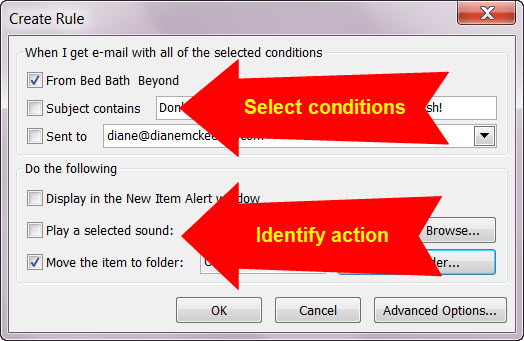
The easiest way to create a rule is to find a message in your mailbox that is an example for the rule and would be affected by the rule such as an email from your boss or from a listserve or, in the example shown here, from Bed Bath and Beyond. I want to create a rule that whenever an email comes in from Bed Bath and Beyond it goes directly to my “offers” folder where I keep emails from stores I frequent. When I have time I’ll look through this folder but I don’t want them cluttering up my inbox.

  • Move your mouse on the email in the list and click with the right mouse button.
  • Choose Rules, Create Rule…
  • Select the conditions and identify the appropriate action and click OK
  • A window will appear asking if you would like to run the rule on the emails currently in your inbox. Running the rule is generally a good idea because it will test the rule.


That’s it. The next time an email comes in to my inbox from Bed Bath and Beyond it will be gone, straight to the “offers” folder. You can use a rule to delete mail from someone who won’t take you off their mailing list. Just create a rule that their mail goes straight to the deleted items folder.

Happy Computing!


4/20/13

[Hack] My Country: build your dream city HD v3.03


Application Name: My Country: build your dream city HD
Current Version: 3.03
Itunes Url: https://itunes.apple.com/us/app/my-country-build-your-dream/id463457137?mt=8

Hack for Non-Jailbroken.

-- 55,500,555 Game Dollers
-- 555,000,555 Country Bucks

Read more »